

The QuillBot AI Content Detector is an online tool that helps users check whether a piece of writing may have been created using artificial intelligence. It analyzes written content, identifies patterns associated with AI-generated text, and provides a detection score.
Today, students, teachers, bloggers, professional writers, and businesses use different tools to review written content. As applications such as ChatGPT, Gemini, and Claude become more popular, identifying AI-generated writing has become increasingly challenging.
This is where the QuillBot AI Content Detector can be useful. The tool helps users review essays, articles, assignments, reports, and other documents. It also highlights passages that may contain AI-generated or AI-refined text.
However, an AI detection score is not proof of who wrote a document. Even original human writing can sometimes be incorrectly identified as AI-generated.
In this guide, you will learn how the QuillBot AI checker works, how to use its free version, how accurate its results may be, and what to do when your writing receives an unexpected AI score.
What Is QuillBot AI Content Detector?
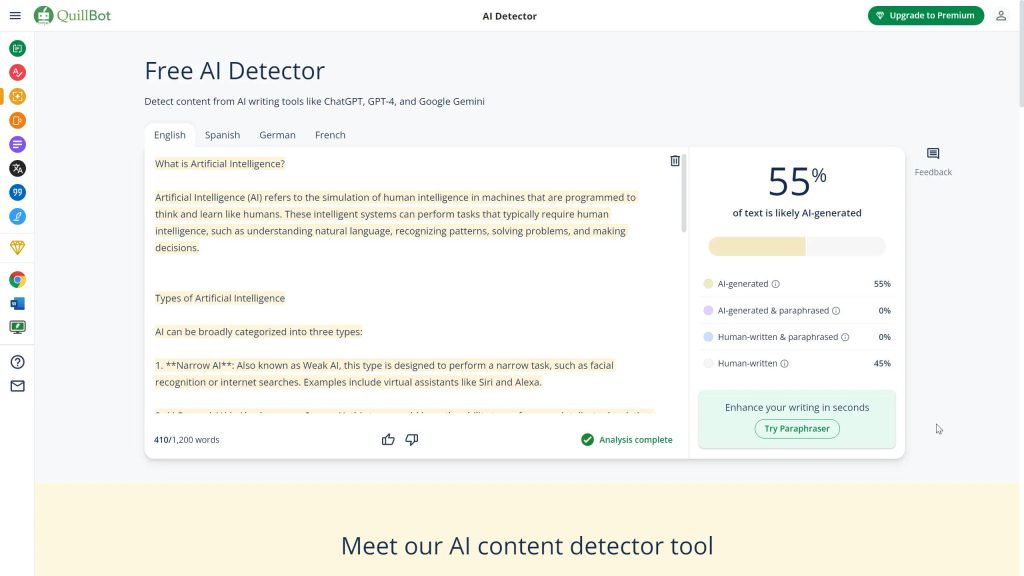
The QuillBot AI Content Detector is a text analysis tool developed by QuillBot. It examines writing patterns to estimate whether text resembles human writing or content produced by an AI system.
Unlike a traditional spelling checker, the detector focuses on how the text is structured.
For example, it may analyze sentence patterns, repetitive expressions, vocabulary choices, and predictable language.
The results can help users identify sections that deserve additional review.
QuillBot’s detector is designed to analyze text produced by different AI writing systems, including ChatGPT, Gemini, Claude, and other language models.
According to QuillBot’s documentation, the tool can distinguish among several classifications, including AI-generated, AI-generated and refined, human-written and AI-refined, and human-written text.
QuillBot AI Detector at a Glance
| Feature | Details |
|---|---|
| Tool name | QuillBot AI Detector |
| Website | quillbot.com |
| Main purpose | Identify patterns associated with AI-written text |
| Free version | Available |
| Minimum text length | 80 words |
| Free scan limit | Up to 1,200 words |
| Free daily usage | Up to 6 scans |
| Premium version | Available |
| AI score | Percentage-based result |
| Sentence analysis | Highlights suspected text |
| Supported languages | Multiple languages |
| Plagiarism detection | Separate tool |
These limits are based on QuillBot’s published feature comparison and may change.
How to Use QuillBot AI Content Detector: Step-by-Step Guide?
Using the QuillBot AI content detector is relatively simple. You do not need advanced technical knowledge to check your writing.
Follow these steps to analyze your text.
Step 1: Visit the Official QuillBot AI Detector Website
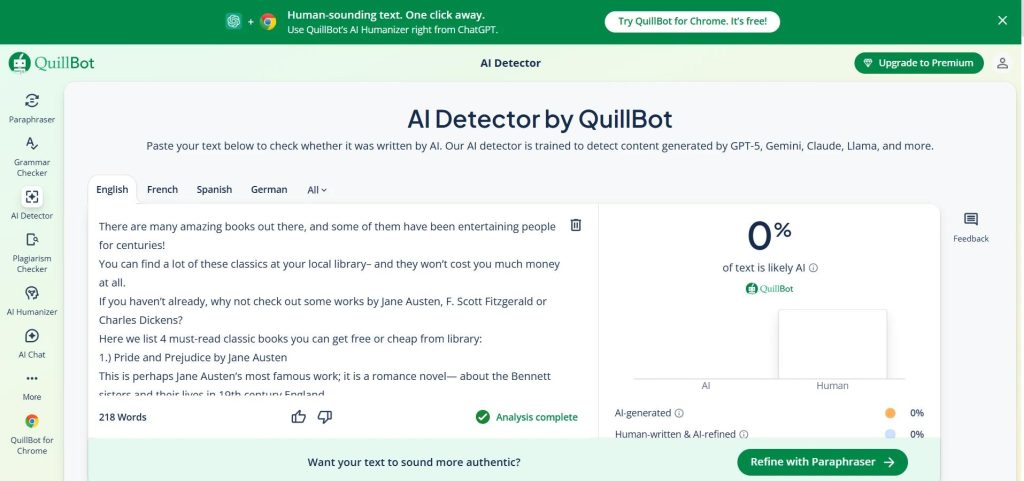
First, open your preferred web browser, such as Google Chrome, Microsoft Edge, Mozilla Firefox, or Safari.
Visit the official website: QuillBot AI Content Detector
The page displays a text input area where you can enter the content you want to analyze.
Make sure you are using the official QuillBot website rather than an unfamiliar third-party website.
Step 2: Copy the Content You Want to Check
Open the document containing your written content. It might be a Microsoft Word file, Google Docs document, blog article, or academic assignment.
Select the portion you want to analyze.
You can use these keyboard shortcuts:
- Windows:
Ctrl + Cto copy. - Mac:
Command + Cto copy.
Before copying, remove information that is not necessary for the analysis, especially confidential personal details.
For better results, use a complete passage rather than a single sentence.
Step 3: Paste the Text Into QuillBot
Return to the QuillBot AI detector.
Click inside the text input area and paste your copied content.
You can use Ctrl + V on Windows or Command + V on Mac.
Check whether your pasted content includes all the paragraphs you want to analyze.
The tool requires at least 80 words. The free version supports up to 1,200 words per scan, according to its current published limits.
If your article is longer, you may need to divide it into smaller sections or consider Premium.
Step 4: Click the Detect AI Button
After entering your content, find the Detect AI button.
Click it to begin the analysis.
The QuillBot AI checker will examine the writing and generate a result.
The scanning process normally takes only a short period, although processing speed can vary according to document length and service conditions.
Avoid changing the text while the analysis is running.
Step 5: Understand the AI Detection Score
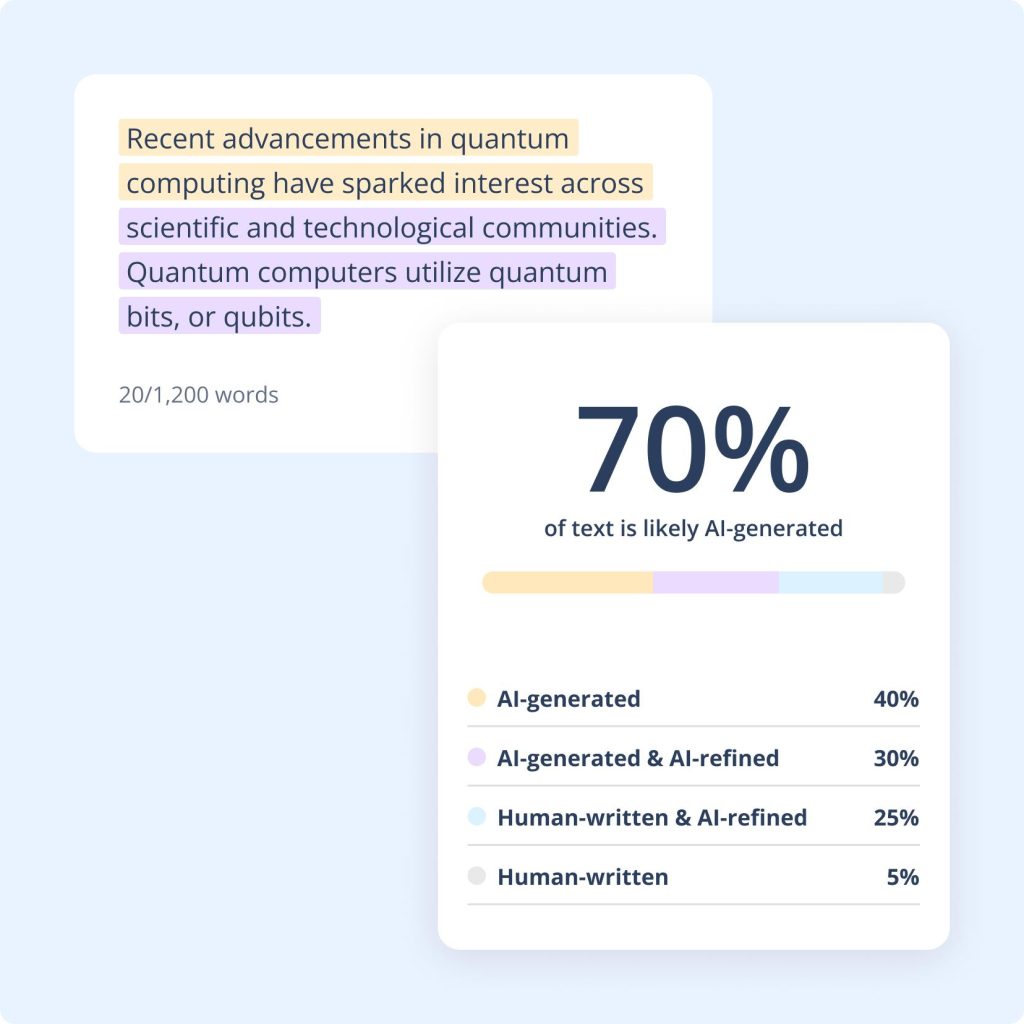
When the scan finishes, QuillBot displays a percentage-based score and may highlight sentences that resemble AI-written content.
For example, suppose you check a 700-word blog article and the detector shows a result of 35% AI-generated.
This does not prove that exactly 245 words were written by AI. The percentage is an estimate produced by the detector’s classification process.
Similarly, a score of 0% does not guarantee that every sentence was written by a human.
Review the highlighted passages, consider how the document was created, and compare the result with other evidence before reaching any conclusion.
Step 6: Review the Highlighted Sentences
QuillBot may identify specific sentences or paragraphs that appear to contain AI-generated or AI-refined writing.
Read each highlighted section carefully.
Ask yourself whether the passage contains specific information, whether the wording accurately represents the author’s intended meaning, and whether there is supporting evidence for important claims.
A passage written in a formal or repetitive style might receive a high AI score even when a person wrote it.
Therefore, the best approach is to evaluate the content rather than automatically removing flagged sentences.
Step 7: Download or Save Your Results
QuillBot also offers reporting features.
If your account includes report downloads, look for the relevant download or export option after completing the analysis.
You can save the report for your records or share it with someone reviewing the document.
QuillBot currently identifies full downloadable reports as a Premium feature.
For important assignments or editorial reviews, retain the original draft and revision history alongside any detection report.
Key Features of QuillBot AI Content Detector
The QuillBot AI checker provides several features designed to help people examine written content. Understanding these features will help you decide whether the tool is suitable for your needs.
1. AI-Generated Text Detection
The primary feature is identifying text that contains patterns commonly associated with AI writing.
For example, someone may use ChatGPT to create an article about healthy eating. QuillBot can analyze that article and estimate whether its language resembles AI-generated content.
The detector does not have direct access to the document’s complete writing history. Instead, it examines patterns within the submitted text.
This distinction is important because human-written and AI-generated text can sometimes look very similar.
2. Sentence-Level Detection
Another useful feature is the ability to highlight passages that appear suspicious.
Instead of relying only on an overall percentage, users can examine the sentences selected by the detector.
For example, a 1,000-word article might contain several different writing styles. Some paragraphs may use personal examples, while others contain formal definitions.
QuillBot may classify those sections differently.
Sentence-level analysis helps reviewers focus on particular passages, although individual sentence classifications should not be treated as conclusive evidence.
3. Detection of AI-Refined Content
Many writers use software to improve grammar, spelling, or sentence structure without allowing it to create an entire document.
QuillBot attempts to distinguish content generated using AI from human writing subsequently refined with AI assistance.
This can be useful for editors reviewing documents that involve different levels of automated assistance.
However, these categories remain predictions. The detector cannot reliably reconstruct every editing step simply by reading the finished document.
4. Support for Multiple Languages
QuillBot’s July 2026 guide identifies six supported languages: English, French, Spanish, German, Dutch, and Portuguese. Quillbot
This allows writers working in different languages to review their content.
For the best results, select the appropriate language when that option is available.
Do not assume that accuracy will be identical across all languages or writing styles.
5. Detailed Detection Reports
QuillBot provides results that help users understand which sections may contain AI-generated patterns.
Some reporting features allow documents to be reviewed and shared.
This can be helpful for editorial teams that maintain records of their review processes.
A saved report should include the date, analyzed text, and any supporting documentation. AI detection models can change, so results obtained at different times may not be identical.
6. Integration With Other Writing Tools
QuillBot offers several additional writing features, including its Paraphraser, Grammar Checker, Summarizer, and Plagiarism Checker.
These tools serve different purposes.
For example, the Grammar Checker focuses on writing errors, while the AI content detector examines patterns associated with automated writing.
Using the tools together may help with proofreading and editorial review, but no combination can establish authorship with complete certainty.
Is QuillBot AI Content Detector Free?
Yes. The QuillBot AI detector free version allows users to analyze text without purchasing a Premium subscription.
However, free usage comes with restrictions.
The published feature comparison lists a 1,200-word limit per scan and six scans per day. Premium removes these limits and provides more extensive explanations.
QuillBot Free vs. Premium
| Feature | Free | Premium |
|---|---|---|
| AI detection | Yes | Yes |
| Words per scan | Up to 1,200 | No stated limit |
| Scans per day | Up to 6 | Unlimited |
| AI percentage score | Yes | Yes |
| Explainer cards | Limited | More detailed |
| Full report downloads | Not included in standard comparison | Available |
| Bulk uploads | Not included | Available |
For occasional use, the free plan may be sufficient.
Students reviewing short assignments, bloggers checking individual sections, and writers examining drafts can start without purchasing a subscription.
Premium may be more suitable for users processing many documents or long articles regularly.
How Accurate Is QuillBot AI Content Detector?
One of the most common questions is whether QuillBot AI detector accuracy is good enough to trust.
The short answer is that QuillBot can help identify suspicious writing patterns, but its results are not completely reliable.
QuillBot advertises a 99% detection rate based on RAID benchmark evaluations. This is a benchmark-specific claim, not a guarantee that the detector will correctly classify 99 out of every 100 real-world documents. Quillbot
Real documents can contain complicated combinations of human writing, automated suggestions, paraphrasing, and editing.
These situations can make detection more difficult.
Why AI Detection Results Can Be Incorrect
AI writing detectors evaluate patterns found in the text.
They generally cannot confirm which individual typed a sentence or which software was used during the writing process.
Two common types of errors can occur.
False positive: The detector identifies human-written text as AI-generated.
False negative: The detector classifies AI-generated content as human-written.
For example, a student might write an essay using short, direct sentences and a consistent structure.
Those characteristics can sometimes resemble automated writing, even when the student created the entire essay independently.
QuillBot acknowledges that false positives can occur. Quillbot Help Center
Factors That Can Affect Detection Accuracy
| Factor | Possible effect |
|---|---|
| Very short text | Less information for analysis |
| Formal academic writing | May resemble predictable AI patterns |
| Repetitive sentences | Can increase AI-like classifications |
| Heavily edited content | Makes authorship harder to infer |
| Mixed human and AI writing | May produce inconsistent results |
| Language and writing style | May affect classification quality |
| Technical terminology | Can create repetitive structures |
A detector score should be treated as a reason to review a document, not as the final decision about its authorship.
What Does the QuillBot AI Detection Percentage Mean?
The results shown by an AI writing detector can be confusing, especially for first-time users.
A percentage-based result indicates the detector’s assessment of whether the analyzed text resembles AI-generated writing.
Why Does QuillBot Detect Human-Written Text as AI?
Sometimes, people write an original article or assignment and receive an unexpectedly high AI score.
This can be frustrating, especially when the content is entirely their own.
Several factors may explain this result.
1. The Writing Is Too Predictable
Certain types of writing follow familiar structures.
For example, technical instructions often contain sentences such as:
“First, open the application. Next, select the settings option. Finally, save your changes.”
Such instructions are common in both human-written and AI-generated guides.
A detector may find the structure predictable.
2. The Content Uses Repeated Expressions
Repeated phrases and similar sentence structures can sometimes influence AI detection results.
For example, a long article may repeatedly use phrases such as “it is important to understand” or “there are several benefits.”
Repetition does not prove automated authorship.
Nevertheless, excessive repetition may make writing less useful and less natural for readers.
3. The Writing Has Been Heavily Edited
Editing can change the original writing style.
A person may create an essay independently and then use grammar tools to correct spelling, punctuation, and sentence structure.
These changes can affect how automated systems classify the final document.
4. The Text Is Too Short
Short passages provide fewer examples of the writer’s vocabulary, sentence structure, and overall style.
QuillBot recommends submitting at least 80 words.
For more useful analysis, include a complete section whenever possible rather than checking isolated sentences.
What to Do When QuillBot Incorrectly Flags Your Writing
If you believe the detector has incorrectly classified your original writing, follow these steps.
- Keep the original document. Preserve your first draft and the file’s revision history.
- Check the highlighted passages. Identify the exact sections flagged by the detector.
- Review the document for clarity. Improve vague or repetitive writing when it genuinely helps the reader.
- Verify important claims. Ensure that statistics, quotations, and references are accurate.
- Keep evidence of your work. Research notes, outlines, and version histories can help establish how a document was created.
- Discuss the result with the reviewer. If a teacher or employer raises concerns, provide relevant evidence rather than relying on another detector score.
Do not introduce deliberate grammatical errors or unnecessary wording changes solely to manipulate the score.
For academic work, follow your institution’s rules concerning writing assistance and disclosure.
QuillBot AI Detector vs. Plagiarism Checker
Many users mistakenly believe that AI detection and plagiarism detection perform the same function.
They are different tools.
| QuillBot AI Detector | Plagiarism Checker |
|---|---|
| Estimates whether text resembles AI writing | Searches for similarities to existing material |
| Analyzes writing patterns | Compares text against source material |
| Produces AI-related classifications | Reports matching passages and sources |
| Cannot confirm authorship | Cannot independently confirm authorship |
| Does not establish copyright infringement | Does not prove that AI was involved |
For example, a person could write an article by copying paragraphs from another website.
An AI detector might classify that article as human-written, even though the content is copied.
Similarly, a completely original passage generated by an AI model might have no plagiarism matches.
Therefore, writers and editors should understand that originality and authorship are separate questions.
Can QuillBot Detect ChatGPT-Generated Content?
The QuillBot AI content detector is designed to recognize patterns associated with text generated by ChatGPT and other large language models.
It can analyze content produced using systems such as ChatGPT, Gemini, and Claude.
However, successful detection depends on the writing sample.
A long, unedited passage may be easier to classify than a short paragraph that has undergone several revisions.
The model used to generate the text, the writing style, and subsequent editing can all affect the result.
Users should not assume that a high score proves ChatGPT was used or that a low score rules it out.
The detector also cannot reliably identify the exact prompt that produced a document.
Does QuillBot AI Detector Affect Google Rankings?
Website owners often wonder whether a high QuillBot AI detection score will damage their Google search rankings.
There is no established basis for saying that Google uses QuillBot’s percentage score as a ranking factor.
Google’s published guidance focuses on content quality, usefulness, reliability, and compliance with its spam policies.
Google also explains that using generative tools to produce many low-value pages for the purpose of manipulating rankings may violate its scaled content abuse policy.
For example, imagine two website owners publishing articles about repairing a washing machine.
The first article contains only general advice repeated across many websites.
The second includes accurate troubleshooting instructions, safety precautions, model-specific guidance, and useful examples.
The second article provides more practical value regardless of the method used to prepare the first draft.
Therefore, bloggers should prioritize:
- Accurate and verified information.
- Clear explanations and original examples.
- Relevant sources and updated instructions.
- Helpful internal links.
- User-friendly formatting.
- Proper editorial review.
The goal should be publishing useful content, not achieving a particular AI detector percentage.
QuillBot AI Detector Not Working? Common Problems and Solutions
Users sometimes experience issues while analyzing content.
The following troubleshooting table explains several common situations.
| Problem | Possible cause | Suggested solution |
|---|---|---|
| Detect AI button not responding | Browser or connection issue | Refresh the page and retry |
| Text shown in red | Insufficient word count | Enter at least 80 words |
| Word limit reached | Free-plan restriction | Shorten the passage or use Premium |
| Daily scans unavailable | Usage limit reached | Check the remaining allowance |
| Results seem inaccurate | Detection uncertainty | Review the text and supporting evidence |
| Document upload fails | File or upload issue | Try supported text input |
| Page does not load | Temporary service or browser issue | Try another browser or revisit later |
Fixing the Not Enough Text Error
One specific issue documented by QuillBot is a red-text warning indicating that there is insufficient content to analyze.
Its help documentation recommends increasing the passage to at least 80 words. Quillbot Help Center
To fix this problem, return to your original document, copy a longer section, and paste it into the detector.
Avoid adding unrelated sentences merely to reach the required word count. They could change the classification of the passage you actually wanted to check.
Fixing Unexpected Results
If the detector produces a result that conflicts with your knowledge of how the document was written, check the text length and language.
Then compare the result against your draft history.
You may perform another scan for review purposes, but repeatedly adjusting the wording to chase a particular percentage is not a reliable way to establish authenticity.
Who Should Use QuillBot AI Content Detector?
The QuillBot AI checker may be useful to several types of users.
Students
Students can review assignments and understand why certain passages resemble AI writing.
The tool may also help them discuss writing practices with teachers.
However, an AI score should not be used as a substitute for proper citation, honest disclosure, or evidence of original work.
Teachers and Educational Institutions
Teachers may use an AI detector as one preliminary indicator when reviewing student submissions.
The more reliable approach is to consider multiple forms of evidence, including drafts, classroom work, citations, and conversations with students.
A detector score alone should never establish academic misconduct.
Bloggers and Content Writers
Bloggers can review large articles for predictable or repetitive language.
They may also use the results to identify passages that deserve additional editorial attention.
Still, content quality should be evaluated through factual accuracy, relevance, originality, and usefulness rather than through AI detection alone.
Editors and Publishing Teams
Editors reviewing submissions from multiple contributors may use detection reports as part of a broader quality-control process.
For example, an editorial team could review a submitted article for factual errors, unsupported statistics, copied content, and possible automated writing.
Each issue requires its own form of verification.
Businesses
Businesses may use detection tools when reviewing reports, marketing material, or outsourced content.
However, companies should avoid uploading confidential customer data, private contracts, or sensitive internal documents without checking the service’s applicable privacy and data-handling terms.
Advantages and Limitations of QuillBot AI Content Detector
| Advantages | Limitations |
|---|---|
| Free version available | Free usage restrictions |
| Simple interface | Scores can be incorrect |
| Supports multiple languages | Cannot prove authorship |
| Sentence-level review | Short passages can be unreliable |
| AI-refined content classifications | Edited text can be difficult to classify |
| Premium reporting options | Some features require payment |
The tool’s greatest advantage is convenience.
Users can submit a passage and receive a quick assessment without performing a complicated technical process.
Its most important limitation is uncertainty. Even an advanced detector cannot reliably establish the full history of how every document was created.
For that reason, QuillBot works best as an additional review tool rather than a definitive authority.
Best Practices for Using QuillBot AI Content Detector
To get more useful results, follow these practical recommendations.
Analyze Meaningful Sections
Use a complete paragraph group, essay section, or article rather than a single sentence.
This provides the detector with more context.
Keep Your Original Drafts
Save outlines, research notes, and earlier versions of important documents.
These materials are especially useful if questions arise concerning authorship.
Use Detection Results Responsibly
Do not accuse a writer of misconduct based only on a percentage score.
Look for supporting evidence and allow the writer to explain the document’s creation process.
Check Originality Separately
Use a plagiarism checker when the question concerns copied content or missing citations.
An AI detector does not replace source verification.
Improve Quality Instead of Chasing Scores
Focus on making writing more accurate, understandable, and helpful.
Add relevant examples, explain complicated ideas, and remove unsupported claims.
These improvements benefit readers regardless of how the detector classifies the text.
Also Read:
Frequently Asked Questions About QuillBot AI Content Detector
Is QuillBot AI Content Detector free to use?
Yes. QuillBot offers a free AI detection tool. Its published free plan permits up to 1,200 words per scan and six scans per day. Users who need unlimited scans, longer document analysis, and detailed reporting can consider Premium. Free-plan features and limits may change, so check QuillBot’s official website for the latest details.
Is QuillBot AI Detector accurate?
QuillBot can identify many patterns associated with AI-generated text, but it is not perfectly accurate. False positives and false negatives are possible. Its advertised benchmark detection rate should not be interpreted as a guarantee for every document. Use the results alongside writing history, contextual knowledge, and other evidence.
Can QuillBot detect ChatGPT writing?
QuillBot is designed to analyze writing generated by ChatGPT and other language models. It examines language patterns and produces a classification. However, results vary depending on text length, writing style, editing, and other factors. The detector cannot conclusively prove that ChatGPT created a particular passage.
What is the minimum word count for QuillBot AI Detector?
QuillBot recommends entering at least 80 words. Very short samples provide insufficient information for dependable analysis. For better context, users should submit longer, coherent passages that represent the document they want to evaluate.
Can QuillBot detect AI content after paraphrasing?
Sometimes. QuillBot attempts to identify AI-generated and AI-refined writing. However, paraphrasing changes the language patterns a detector analyzes. This means the results can vary. Using a paraphrasing tool does not guarantee that AI-generated content will be detected, nor does it establish that the content was independently written.
Does QuillBot AI Detector check plagiarism?
No. QuillBot’s AI detector and plagiarism checker serve different purposes. The AI detector estimates whether text resembles automated writing, while a plagiarism checker looks for similarities to existing sources. A document can be original and AI-generated, or copied and human-written.
Can I use QuillBot AI Detector without signing up?
QuillBot’s published guidance states that users can access the free detector without creating an account for eligible short scans. However, certain features and usage allowances may require signing in. Check the current interface to confirm which options are available without registration.
Why does QuillBot say my original writing is AI-generated?
A false positive may occur when human-written content resembles patterns frequently found in automated writing. Formal wording, repeated expressions, and consistent sentence structures can contribute to this problem. Preserve your drafts and revision history if you need to demonstrate how the document was created.
Can QuillBot detect AI content in different languages?
Yes. QuillBot supports multiple languages. Its July 2026 documentation identifies English, French, Spanish, German, Dutch, and Portuguese. Detection performance can vary according to language, writing style, and text length. Users should verify current language availability through the official detector.
Is QuillBot AI Detector better than other AI checkers?
There is no universal answer. Different detectors use different models, training data, and classification methods. A tool that performs well on one dataset may perform differently on another. QuillBot provides convenient free detection and sentence-level feedback, but the best choice depends on the user’s needs and the reliability of available evidence.
Can QuillBot AI Detector identify which AI model wrote a text?
QuillBot can analyze writing patterns associated with different AI systems, but a detection score does not establish the exact model responsible for creating a passage. Similar writing styles can appear across multiple systems. Users should avoid treating a model-specific assumption as verified evidence.
Does a 100% human score guarantee original writing?
No. A human classification does not guarantee originality, factual accuracy, or proper citation. It also does not prove that no automated tools were used. For important documents, review the content, verify sources, and preserve evidence of the writing process.
Conclusion
The QuillBot AI Content Detector is a useful online tool for reviewing writing and identifying patterns associated with AI-generated text.
Its free version makes it accessible to students, teachers, bloggers, and professional writers who need occasional AI content checks.
Features such as percentage-based results, sentence highlighting, and classifications of AI-refined writing can help users understand why certain passages require further review.
However, users should recognize that AI detection is not an exact science. Human writing may be flagged incorrectly, and AI-generated text may sometimes escape detection.
For the best results, use QuillBot as part of a wider review process that includes source verification, editorial judgment, and documentation of how the content was created.
You can access the tool directly through the official QuillBot AI Detector website.