

Are you having trouble programming your Genie 2028 garage door opener? Perhaps you purchased a new remote control, replaced an old keypad, or want to connect your garage door opener to your car. The good news is that Genie 2028 programming is usually simple when you follow the correct instructions.
The Genie 2028 is a popular residential garage door opener that uses Genie Intellicode security technology. It supports compatible wireless remote controls, garage door keypads, and certain built-in vehicle control systems, including HomeLink and Car2U.
However, the programming process can sometimes become confusing. You might not know where the programming button is located, why the LED light is flashing purple, or why your remote still does not operate the door.
This complete guide explains how to program a Genie 2028 garage door opener, pair a new remote, connect a wireless keypad, set travel limits, erase old remotes, and solve common problems.
Whether you are programming the opener for the first time or reconnecting an existing remote, the instructions below will help you complete the process safely.
Quick Answer: How Do You Program a Genie 2028 Garage Door Opener?
To program a compatible remote to your Genie 2028, follow these simple steps:
- Find the PROGRAM/SET button on the garage door opener’s motor unit.
- Press and hold the button for approximately two seconds until the round LED turns blue.
- Release the button when the long LED begins flashing purple.
- Stand at least five feet away from the opener.
- Slowly press and release the button on your garage door remote twice.
- Wait for the opener’s indicator lights to flash and turn off.
- Press the remote button again to check whether the garage door operates.
If the door moves correctly, the remote has been programmed successfully.
These steps follow the documented Genie 2028 remote programming sequence.
What Is the Genie 2028 Garage Door Opener?
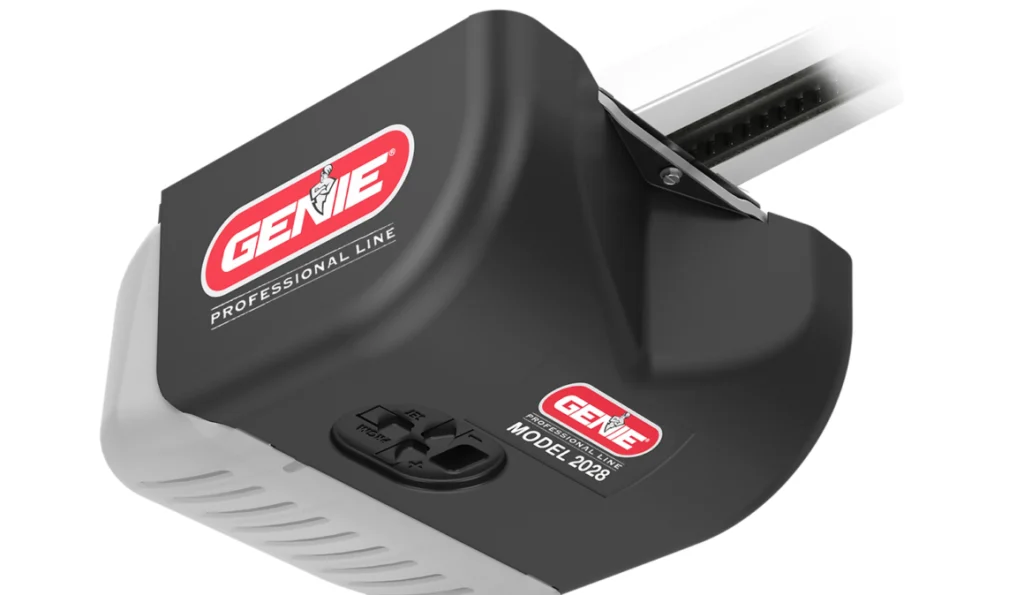
The Genie Model 2028 garage door opener is part of the ReliaG Pro Series. It is designed for residential sectional garage doors and is available with either a belt-drive or chain-drive configuration.
The opener includes several convenient functions that make daily garage access easier.
Important features of the Genie 2028
| Feature | Details |
|---|---|
| Model number | Genie 2028 |
| Drive system | Belt or chain |
| Motor | DC motor with soft start and stop |
| Security technology | Genie Intellicode |
| Wireless capacity | Up to 16 devices, including remotes and keypads |
| Vehicle compatibility | HomeLink and Car2U |
| Programming controls | PROGRAM/SET, UP (+), DOWN (–) |
| Safety system | Safe-T-Beam and contact reversal protection |
The opener uses rolling-code security technology, which changes the transmitted access code during operation. This reduces the risk associated with copying a fixed remote code.
Genie also provides dual-frequency technology to help communication between the opener and compatible accessories.
Why would you need to program a Genie 2028?
You may need to program or reprogram your opener when:
- You purchase an additional garage door remote.
- Your existing remote loses its connection.
- You install a new wireless keypad.
- You want to operate the garage door from your vehicle.
- You erase old remote controls for security.
- You replace certain opener components.
- You need to correct the garage door’s opening or closing limits.
Remember that programming a remote is different from programming the door’s travel limits. Remote programming pairs an accessory with the motor unit, while travel-limit programming determines where the garage door stops.
Things to Check Before Genie 2028 Programming
Before starting, make sure that the garage door opener is ready to receive programming instructions.
1. Check the power supply
The opener must have electrical power to enter programming mode.
Make sure its power cord is securely connected to a working outlet. If the opener does not respond, inspect the circuit breaker and check whether other devices connected to the same circuit are working.
Do not open electrical covers or touch internal wiring to troubleshoot a power problem. Contact a qualified technician if you suspect an electrical fault.
2. Check the remote battery
A weak or discharged battery is a common reason a remote will not pair.
If you are using a new remote, inspect its battery compartment for a protective plastic tab. Remove the tab before attempting to program it.
If you are using an older remote, replace its battery with the correct type specified for that remote model.
3. Confirm remote compatibility
Not every garage door remote is compatible with the Genie 2028.
Use a remote that Genie specifically lists as compatible with the opener’s Intellicode system. Some universal remotes also work, but they may require additional setup or a specific programming mode.
Do not assume that a remote will work simply because it has the Genie logo.
4. Keep the garage door area clear
Remove bicycles, tools, toys, vehicles, and other objects from the path of the garage door.
Keep children and pets away from the doorway while programming and testing the opener.
5. Locate a stable working position
The programming controls are on the overhead motor unit. If you need a ladder to reach them, place it on a firm, level surface and follow the ladder manufacturer’s safety instructions.
Do not stand on the top step or lean toward moving garage door components.
Where Is the Learn Button on a Genie 2028?
One of the most common questions is where to find the Genie 2028 learn button.
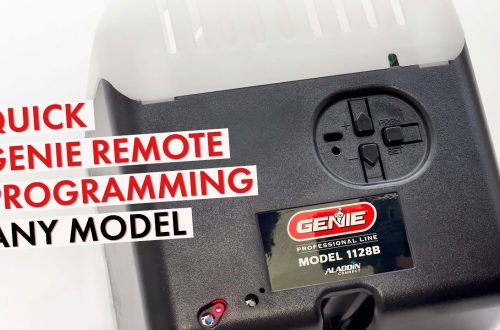
Unlike some older garage door openers, the Genie 2028 uses a PROGRAM/SET button rather than a separate button labeled LEARN.
You can find the programming controls on the motor unit mounted near the garage ceiling.
How to identify the programming controls
Look for a group of three buttons and two LED indicators.
The controls normally include:
- PROGRAM/SET: Starts and confirms programming operations.
- UP (+): Controls upward door movement during travel-limit programming.
- DOWN (–): Controls downward movement during travel-limit programming.
- Round LED: Displays a programming status using different colors.
- Long LED: Provides additional programming feedback.
For remote pairing, the round LED turns blue when you hold PROGRAM/SET. After you release the button, the long LED flashes purple to indicate that the opener is ready for a remote signal.
Do not confuse the PROGRAM/SET button with the wall-mounted button used to open and close the garage door. movingupgaragedoors.com+1
How to Program Genie 2028 Garage Door Opener Remote?
If you want to add or reconnect a wireless remote, follow the instructions below.
Step 1: Prepare your Genie remote
- Take the remote you want to pair with the opener.
- Check its battery and remove any protective battery film. If the remote has multiple buttons, decide which button you want to use for this particular garage door.
- For example, if you have a three-button remote and two garage doors, you may use the first button for one opener and the second button for another.
- Each button must be programmed separately.
Step 2: Find the PROGRAM/SET button
- Go to the motor unit mounted near the ceiling.
- Locate the PROGRAM/SET control and the two LED indicator lights.
- Make sure you can see the indicators clearly before pressing the button.
Step 3: Enter programming mode
- Press and hold the PROGRAM/SET button for approximately two seconds.
- Watch the round LED.
- When the round indicator turns solid blue, release the button.
- The long LED should begin flashing purple, showing that the opener is ready to receive the remote signal.
- Avoid holding the button unnecessarily long or repeatedly pressing other programming controls.
Step 4: Press the remote button twice
- Move at least five feet away from the garage door opener.
- Slowly press and release the selected remote button two times.
- Do not press it too quickly. Give the opener enough time to recognize the signal.
- The opener’s LED indicators should flash and turn off when the remote has been successfully paired.
- If the indicators remain active, try slowly pressing and releasing the selected remote button again.
Step 5: Test the remote control
- After the opener accepts the programming signal, press the same remote button once more.
- The garage door should begin opening or closing.
- Observe the door from a safe position and make sure it moves normally.
- If it works, the Genie 2028 remote programming process is complete.
- If the door does not respond, repeat the procedure from Step 3.
Step 6: Program additional remotes
- If your household uses more than one garage door remote, repeat the same steps for each additional compatible remote.
- For example, one remote could remain in your vehicle while another is carried by a family member.
- You do not ordinarily need to erase the first remote before adding a second one, provided the opener has available wireless-device capacity.
- Important: The Genie 2028 can pair with up to 16 wireless devices, according to Genie’s published specifications.
How to Program Genie 2028 Wireless Keypad?
A wireless keypad allows you to operate the garage door by entering a personal identification number (PIN). This is especially useful when you do not have your remote control or want to provide temporary access to someone in your household.
The keypad programming procedure is slightly different from the remote programming process.
The following steps apply to the Genie GK-R wireless keypad. If you have another keypad model, check its specific instructions before continuing.
Step 1: Activate the wireless keypad
- Open the battery compartment on the back of the keypad.
- If the keypad is new, remove the protective battery tab.
- Close the battery compartment and check whether the keypad’s indicator lights respond when you press a button.
- If nothing happens, confirm that the batteries are installed correctly.
Step 2: Create a personal PIN
Before connecting the keypad to the opener, you need to create a PIN.
Follow these instructions:
- Make sure the keypad backlight is off.
- Press 3, 5, and 7 in that order.
- Press the PROGRAM button.
- Enter a new PIN containing three to eight digits.
- Press PROGRAM again.
The keypad LED should blink twice and turn off, confirming that the PIN has been accepted.
Choose a PIN that you can remember but that other people cannot easily guess.
Avoid obvious combinations such as your home address or common number patterns.
Step 3: Activate programming mode on the opener
Go to your Genie 2028 motor unit.
Press and hold the PROGRAM/SET button until the round LED turns blue.
Release the button.
The long LED should flash purple to show that the opener is waiting for a signal from the keypad.
Step 4: Connect the keypad to the opener
- Return to the keypad and enter your new PIN.
- Slowly press the UP/DOWN button.
- Continue pressing the UP/DOWN button as directed until the garage door responds. The GK-R instructions specify three or four slow presses during pairing.
- After the opener operates, the keypad should be connected successfully.
Step 5: Test the keypad
- Wait until the keypad is no longer in its active programming state.
- Enter your PIN again and press UP/DOWN.
- The garage door should open or close.
- If it does not respond, check the keypad batteries and repeat the synchronization process.
Step 6: Mount the keypad securely
- If the keypad is not already installed, mount it in a visible and accessible location outside your garage.
- Follow the keypad installation instructions for mounting height and location. Keep the keypad away from moving door parts and out of children’s reach.
- Genie recommends programming the GK-R keypad before mounting it because this makes the setup process easier.
How to Change or Reset the Genie 2028 Keypad PIN?
You may want to change your keypad PIN if you recently moved into a property, shared the code with another person, or believe someone knows your current PIN.
For a GK-R keypad, the documented reset procedure lets you start again from the default programming state.
Steps to reset the GK-R keypad
- Wait until the keypad backlighting is off.
- Press and hold the PROGRAM and UP/DOWN buttons together.
- Continue holding for approximately five seconds.
- Release the buttons after the keypad LED flashes twice and the lights turn off.
- Set a new PIN using the 3-5-7 programming sequence.
- Pair the keypad with the garage door opener again.
After finishing, test the new PIN several times.
Keep in mind that resetting the keypad and clearing the motor unit’s remote memory are different operations. A keypad reset does not necessarily remove other remotes already connected to the opener.
If you are using a different Genie keypad model, follow the reset instructions for that keypad rather than assuming every model uses the same button combination.
How to Program Genie 2028 With HomeLink in Your Car?
Many vehicles include a built-in garage door control system called HomeLink. It allows you to operate compatible garage doors without carrying a separate remote.
The Genie 2028 is compatible with HomeLink, although the exact programming instructions can vary by vehicle model, year, and HomeLink generation.
Step 1: Prepare your vehicle
- Park your vehicle in a safe position near the garage, outside the door’s path.
- Keep the Genie remote nearby and turn on the vehicle’s ignition or accessory power if required by the vehicle manufacturer.
- Choose the HomeLink button that you want to use.
Step 2: Train HomeLink with the Genie remote
- For HomeLink systems that require transmitter training, hold the working Genie remote approximately two inches from the HomeLink controls.
- Press and hold the selected HomeLink button and the remote control button as instructed for your vehicle.
- Watch the HomeLink indicator.
- When the indicator changes from slow blinking to rapid blinking, release the buttons.
- This usually indicates that HomeLink has received the remote signal.
- Some newer HomeLink systems may use a different procedure that does not require this training step.
Step 3: Enter programming mode on the Genie 2028
- Go to the overhead garage door opener.
- Press and hold PROGRAM/SET until the round LED turns blue.
- Release the button and check for the flashing purple LED.
Step 4: Complete the HomeLink pairing process
- Return to your vehicle.
- Press the chosen HomeLink button according to your vehicle’s instructions. Some systems require two or three separate presses before the opener responds.
- Avoid holding the button continuously unless your vehicle instructions specifically require it.
Step 5: Test the connection
- Press the programmed HomeLink button.
- The Genie 2028 should operate the garage door.
- If it does not work, check whether your HomeLink system needs a different training sequence.
Important: Do not clear all HomeLink buttons unless necessary. A full HomeLink reset may remove other garage door or gate settings stored in your vehicle.
How to Set Genie 2028 Garage Door Travel Limits?
Travel limits control how far your garage door opens and closes.
These settings are important because an incorrect travel limit can prevent the door from closing fully or cause it to press too firmly against the floor.
Travel-limit programming is different from pairing a wireless remote. You generally need to adjust travel limits during initial setup or after certain repairs.
Before proceeding, verify that your specific Genie 2028 manual matches the three-button control layout described below.
Step 1: Prepare the garage door
- Make sure the garage door is properly connected to the opener carriage.
- Remove obstacles from the doorway.
- Check that the opener has power and that the door can move without obvious mechanical problems.
- Do not attempt travel-limit programming if the door is damaged, off its tracks, unusually heavy, or has a broken spring or cable.
Step 2: Set the down travel limit
- Locate the DOWN (–) button on the motor unit.
- Press and hold it for approximately two seconds until the long LED turns blue, then release it. The long LED should begin flashing blue.
- Use the DOWN button to move the garage door toward the floor.
- Release the button as the door reaches the fully closed position. Make small adjustments using the UP (+) or DOWN (–) buttons if needed.
- The door should rest against the floor without excessive pressure or visible bending.
- Press PROGRAM/SET to save the down travel setting.
Step 3: Set the up travel limit
- Locate the UP (+) button.
- Press and hold it for approximately two seconds until the long LED turns blue, then release it.
- The round LED should begin flashing blue.
- Use the UP button to move the garage door toward the desired fully open position.
- Stop when the door is properly opened, with adequate clearance from the motor unit and rail components.
- Press PROGRAM/SET to save the setting.
Step 4: Run the opener through a complete cycle
- Operate the garage door using the wall control.
- Allow it to open fully and then close fully.
- For the Genie 2028, force-control settings are generally established automatically during operation rather than through ordinary user adjustment.
- Watch for unusual sounds, shaking, or resistance.
Step 5: Test the safety reversal system
- After setting travel limits, perform the contact-reversal test described in your owner’s manual.
- A common test uses a flat 2-by-4 board placed on the floor beneath the center of the door. When the closing door contacts the board, it must reverse as required by the manufacturer’s instructions.
- Also verify that the Safe-T-Beam photoelectric sensors prevent the door from closing onto an obstruction.
- If either safety test fails, stop using the automatic closing function until the problem is corrected.
- Never increase closing force to compensate for a binding door or faulty safety sensor.
The documented Genie 2028 setup sequence includes down and up travel limits, force control, and safety reversal testing before normal use.
How to Reset Genie 2028 Garage Door Opener Remote Memory?
If you lose a remote control, move into a new home, or want to remove previously authorized wireless devices, clearing the opener’s remote memory may be appropriate.
This operation removes stored wireless-device associations from the opener.
It is more extensive than simply programming an additional remote.
Step-by-step instructions
- Locate the PROGRAM/SET button on the Genie 2028 motor unit.
- Press and hold it for approximately two seconds until the round LED turns blue.
- Release the button and wait for the long LED to flash purple.
- Press and hold the UP (+) and DOWN (–) buttons together.
- Continue holding until both LED indicators flash blue and turn off.
- Release the buttons.
- Test a previously programmed remote to verify that it no longer operates the door.
You will need to program your authorized remotes and wireless keypads again after completing this procedure.
The wired wall control should continue functioning normally.
When should you erase remote memory?
Clearing wireless-device memory can be useful when:
- A remote is missing or stolen.
- A previous property occupant may still have access.
- You want to revoke access from old devices.
- You need to rebuild the opener’s authorized remote list.
Do not erase the memory as the first troubleshooting step for a weak remote battery or an incorrectly entered keypad PIN.
It creates additional setup work and may disconnect functioning devices.
Genie 2028 Programming Troubleshooting Guide
Sometimes the programming instructions appear to work, but the garage door still does not respond.
Use the following troubleshooting table to identify common causes.
| Problem | Possible cause | What to do |
|---|---|---|
| Remote does not respond | Dead battery or incompatible remote | Replace battery and confirm compatibility |
| Purple LED keeps flashing | Pairing not completed | Repeat the remote pairing sequence |
| Both LEDs show red | Programming time expired | Restart the programming process |
| Keypad does not illuminate | Weak batteries | Check or replace keypad batteries |
| Door opens but will not close | Safety sensor problem | Inspect Safe-T-Beam alignment and obstruction |
| HomeLink does not connect | Incorrect training sequence | Follow vehicle-specific HomeLink instructions |
| Door stops too early | Incorrect travel limits or mechanical issue | Inspect the door and verify travel settings |
| Remote works only nearby | Weak battery or radio interference | Replace battery and check for interference |
Problem 1: Genie 2028 remote not working after programming
- If the remote does not operate the door, first confirm that it is compatible with the opener.
- Next, check the battery and try programming again.
- Stand at least five feet from the motor unit while pairing the remote.
- Press the remote button slowly and separately rather than repeatedly pressing it as fast as possible.
- If the opener’s LEDs never acknowledge the remote signal, test another compatible remote if available.
- This can help determine whether the problem is with the remote or the opener.
Problem 2: Genie 2028 flashing purple light
- A flashing purple long LED normally indicates that the opener is in remote or accessory programming mode.
- This is expected immediately after entering the programming sequence.
- If you are trying to pair a remote, continue with the remote button instructions.
- If pairing is not completed within the allowed time, the opener may exit programming mode.
Problem 3: Genie 2028 red LED during programming
- A red LED indication can occur when the programming process times out.
- The Genie 2028 programming procedure normally gives you approximately 30 seconds to complete a step after the function is initiated.
- If the time expires, restart that step.
- However, red LED signals can mean different things depending on whether you are programming, operating, or diagnosing the opener.
- Consult the exact LED diagnostic table for your model before assuming that every red light represents the same issue.
Problem 4: Garage door opens but does not close
- If the garage door opens normally but refuses to close, inspect the Safe-T-Beam safety sensors near the bottom of the doorway.
- Make sure nothing blocks the invisible beam between the sensors.
- Check for dirt, loose mounting brackets, or obvious misalignment.
- Do not bypass or disconnect the sensors.
- Genie specifically states that the safety beam system must not be removed or disabled. Product Support Information
Problem 5: Genie 2028 keypad programming fails
- First, check that the PIN was saved successfully.
- If you are using the GK-R keypad, confirm that it completed the PIN setup sequence before attempting to pair it with the opener.
- Then restart the synchronization process.
- If the keypad lights flash rapidly, wait until the lights go out before trying again.
- A keypad with weak batteries may also fail to transmit consistently.
Problem 6: Remote works only at a short distance
A weak battery can reduce reliable operating range.
Radio interference from certain electrical devices or lighting products can also affect wireless remote performance.
Try the following:
- Replace the remote battery.
- Test the remote from a clear location.
- Check whether the problem occurs only when particular garage lights are switched on.
- Use compatible garage door opener LED bulbs.
- Make sure the opener’s antenna is not visibly damaged or trapped against metal.
If the range remains unusually short with several compatible remotes, seek qualified service rather than attempting to modify the opener’s internal radio components.
Common Genie 2028 Programming Mistakes to Avoid
Many programming failures happen because a small instruction is missed.
Using the wrong programming button
The Genie 2028 uses PROGRAM/SET for pairing remote devices. Do not confuse it with UP and DOWN travel controls.
Pressing the remote too quickly
The opener needs to recognize separate button presses. Press and release the remote button slowly during programming.
Ignoring the LED indicators
The LED indicators provide useful feedback. The round blue indicator and flashing purple long indicator are particularly important during remote pairing.
Allowing the programming mode to expire
The programming window is limited. Have the remote or keypad ready before activating programming mode.
Erasing all devices unnecessarily
Clearing memory can disconnect every stored remote and keypad. Reserve this step for situations where wireless-device access needs to be revoked or reset.
Ignoring door safety
Never treat a successful remote pairing as proof that the garage door is mechanically safe.
The door must still open and close smoothly, and its safety systems must operate correctly.
Tips to Keep Your Genie 2028 Working Properly
Programming your Genie 2028 garage door opener is only one part of maintaining the system. Regular inspections and proper use can help prevent unexpected problems.
Check your remote batteries regularly
If you notice that your remote works inconsistently, inspect its battery before attempting to reprogram it.
Keep the battery compartment clean and make sure the battery is installed in the correct orientation.
Inspect the garage door safety sensors
The Genie Safe-T-Beam sensors are positioned near the bottom of the doorway.
Keep their lenses clean and remove objects that could block the beam.
If the sensors appear damaged or are not operating correctly, arrange for proper repairs.
Test the garage door reversal system
Perform the contact-reversal test according to Genie’s maintenance schedule.
If the garage door fails to reverse when required, do not continue using the automatic closing function.
Keep the moving components in good condition
Listen for unusual grinding, scraping, or rattling noises.
If the garage door begins moving unevenly, stop operating it until the cause has been identified.
Garage door springs, cables, and other tensioned components can cause serious injury. Leave repairs involving these components to qualified professionals.
Keep your wireless access secure
Avoid sharing your keypad PIN unnecessarily.
If a remote disappears, consider clearing the opener’s wireless memory and programming only the devices you still authorize.
These simple habits can help maintain reliable and secure garage access.
Frequently Asked Questions About Genie 2028 Programming
How do I program a Genie 2028 garage door opener?
Press and hold the PROGRAM/SET button until the round LED turns blue. Release it when the long LED begins flashing purple. Stand at least five feet away and slowly press and release your compatible remote button twice. The opener LEDs should flash and turn off. Press the remote button again to test whether the garage door operates.
Where is the learn button on a Genie 2028 garage door opener?
The Genie 2028 uses a PROGRAM/SET button instead of a separate button labeled LEARN. It is located on the overhead motor unit near the UP (+) and DOWN (–) programming controls and the LED indicators. Hold PROGRAM/SET until the round LED turns blue to enter the remote programming mode.
How do I reset my Genie 2028 garage door opener?
If you want to erase stored wireless remotes, enter programming mode using PROGRAM/SET. When the long LED flashes purple, press and hold the UP and DOWN buttons together until the indicator lights flash and turn off. This clears the stored remote associations. You must then reprogram your authorized wireless devices.
Why is my Genie 2028 remote not programming?
Common reasons include an incompatible remote, weak battery, expired programming window, or incorrectly timed button presses. Confirm that the opener displays the expected blue and purple programming indicators. Stand at least five feet from the motor unit, then slowly press and release the remote button twice. Repeat the process if necessary.
What does the flashing purple light mean on Genie 2028?
A flashing purple long LED normally indicates that the opener has entered remote or accessory programming mode and is ready to receive a pairing signal. This is expected after you hold and release the PROGRAM/SET button. If the programming window expires, restart the process.
How do I program a wireless keypad to my Genie 2028?
For the Genie GK-R keypad, press 3-5-7, press PROGRAM, enter your new three-to-eight-digit PIN, and press PROGRAM again. Next, place the garage door opener in programming mode. Enter the PIN on the keypad and slowly press UP/DOWN until the opener operates. Other keypad models may use different instructions.
Can I program a Genie 2028 to my car?
Yes. The Genie 2028 supports compatible HomeLink and Car2U vehicle systems. HomeLink programming may involve training a vehicle button with a working Genie remote and then pairing the vehicle with the opener using PROGRAM/SET. The exact sequence depends on your vehicle and its built-in control system.
How many remote controls can the Genie 2028 support?
According to Genie’s official product specifications, the Model 2028 supports up to 16 wireless devices, including compatible remotes and keypads. If you need to add another remote, follow the pairing instructions. You normally do not need to erase existing remotes unless you want to remove their access.
Why does my Genie 2028 garage door opener flash red?
Red LED signals can indicate a programming timeout or another operating condition, depending on the LED pattern and what the opener is doing. If red LEDs appear after an unsuccessful programming attempt, restart the sequence. If red indicators continue during normal operation, consult the model-specific diagnostic instructions.
Can I program a Genie 2028 without the original remote?
Yes. You can usually pair a compatible replacement remote directly using the PROGRAM/SET button on the motor unit. The original remote is not required for ordinary remote pairing. However, some vehicle HomeLink programming methods may need a working Genie transmitter.
Will unplugging my Genie 2028 erase its programming?
Simply disconnecting the opener from electrical power is not the documented method for erasing remote memory. If your goal is to remove authorized wireless devices, follow the dedicated memory-clearing sequence. If your opener loses operation after a power interruption, check its power supply and operating condition before attempting to reprogram everything.
Can I use a universal remote with the Genie 2028?
Some universal garage door remotes are compatible with the Genie 2028, but compatibility depends on the particular remote model and supported coding system. Check the remote manufacturer’s compatibility list and programming instructions before purchasing or pairing the accessory.
Final Thoughts
Learning how to program a Genie 2028 garage door opener is straightforward once you understand the PROGRAM/SET controls and LED indicators.
For most users, the process involves holding the programming button until the round LED turns blue, releasing it when the long LED flashes purple, and pairing the remote using two slow button presses.
The Genie 2028 also allows you to connect a compatible wireless keypad or vehicle control system. These accessories can make garage access more convenient without changing the opener’s normal operating functions.
If you experience programming problems, check the remote battery, device compatibility, indicator lights, and programming timing before attempting a complete memory reset.
Most importantly, always keep the garage door’s safety features operational. If the door moves unevenly, fails to reverse correctly, or shows signs of mechanical damage, contact a qualified garage door technician.
With the correct instructions and regular maintenance, your Genie 2028 can provide convenient and reliable everyday garage access.